
Hotel Lobby AI Images: Prompts, Two-Person Framing and Crop Fixes
Plan a Hotel Lobby-inspired duo image with three original prompts, an exact crop example and a checklist for faces, microphones and later animation.
What's new on this page
- — Page published.
Watch the illustrated guide
Original illustrated explanation with synthesized English narration and English captions. No generation test or original performance footage.
English transcript
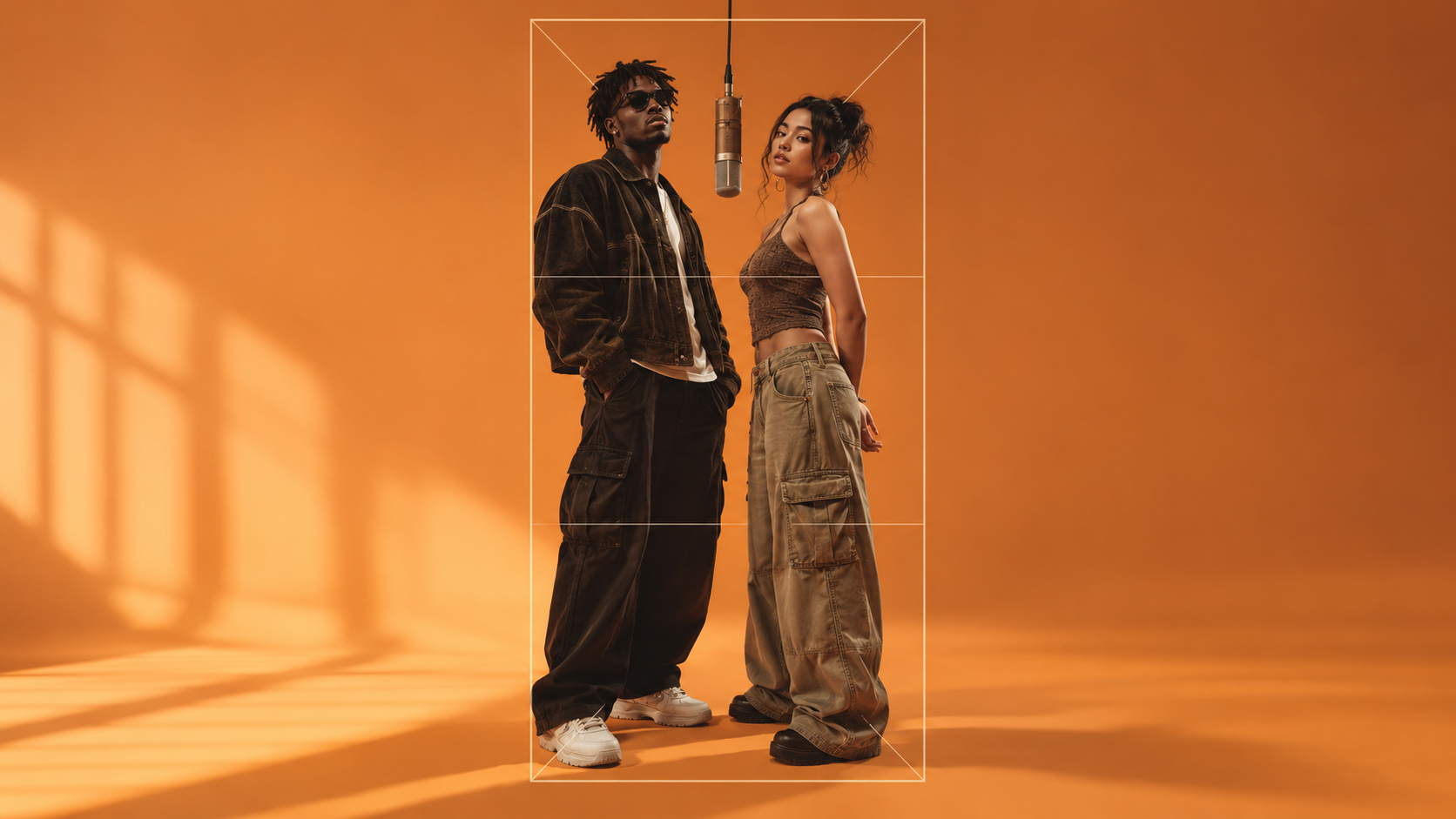
A wide two-person image can lose one or both subjects when cropped vertically. Place important elements inside the intended final frame. For a centered nine by sixteen crop of a sixteen by nine image at the same height, the retained width is eighty-one over two hundred and fifty-six: about thirty-one point six percent. Keep both faces and the shared microphone readable. Inspect the image at thumbnail size as well as enlarged before requesting movement. A good first frame provides a plan, not a guarantee of stable animation. This is a geometric illustration, not a model generation result.
For a Hotel Lobby-inspired AI image, describe the scene before relying on the name: two performers, a warm orange studio, one suspended microphone and a view that keeps both faces readable. “Hotel lobby” by itself can also produce an architectural reception area. Decide which picture you want before choosing a model or spending credits.
This guide focuses on the first still image in the dotsai.pro image workspace. It includes original prompt examples and a crop calculation. The existing illustrated video explains composition; it is not a product test or evidence that a particular model generated the examples below.
Choose between an orange studio and an actual lobby
| Intended image | Describe explicitly | Avoid leaving ambiguous |
|---|---|---|
| Minimal duo performance | Seamless orange studio, two performers, one hanging microphone | The phrase Hotel Lobby alone |
| Elegant interior performance | Two people at a microphone in a furnished hotel interior | Whether reception furniture should dominate |
| Architectural lobby image | Entrance, seating, reception layout and materials | Unwanted performers or musical props |
The orange performance concept and a literal hotel interior can both be useful, but they need different instructions. Pick the setting that supports your use: a feed image, a duo portrait, a storyboard frame or an interior concept.
Plan the destination before the composition
A wide pair can look balanced in landscape and lose a person when cropped vertically. Choose an available aspect ratio that fits the intended destination. If you need several versions, plan them separately rather than assuming one wide image will crop cleanly everywhere.
Here is the exact geometry for a common mistake. Start with a 1920 by 1080 image. A centered 9:16 crop keeping its full height is only 607.5 pixels wide before rounding. It retains 607.5 / 1920 = 81 / 256, or about 31.6% of the original width. Almost 68.4% of the width is removed.
This is a geometric calculation, not observed dotsai.pro behavior. It assumes a centered crop, unchanged height and no padding or generative expansion. If your editor scales, pads or reframes, the outcome differs. The practical lesson is to inspect the final frame rather than trust the original wide layout.
Give the pair room without making faces tiny
For a medium duo portrait, place both faces in the same readable band and keep enough space between shoulders for the microphone. Avoid putting the microphone directly over a mouth or eye. Leave headroom so a later crop does not remove hair or hats.
Use similar apparent scale for the two subjects unless the scene deliberately needs a size difference. If one is a distant full-body figure and the other is a close selfie, the model has more conflicting composition information to reconcile. When references are supported, select compatible views and inspect the composed result before animation.
Three original Hotel Lobby image prompts
These are suggested briefs, not tested generations. Use original fictional performers or photos you have permission to upload. Match the written request to controls the selected mode actually supports.
1. A clean orange-studio duo
Two distinct fictional adult performers in a seamless warm-orange studio, one suspended microphone centered between them. Left performer wears a dark navy jacket; right performer wears a cream shirt. Waist-up view, faces at a similar height, space between shoulders, soft frontal light and a steady eye-level composition. Clear eyes and mouths, no lettering, no extra people.
The contrasting clothes make the pair easier to inspect. Start here if your main goal is a readable two-person frame rather than an elaborate interior.
2. A relaxed lobby celebration
Two original adult friends share a microphone in a warm hotel lounge after a reunion. One burgundy jacket and one muted green jacket, relaxed smiles, chest-up composition. Soft ceiling lights remain in the background, with no reception desk blocking the figures. Both faces fully visible, one microphone between them, restrained details and no text.
The room supplies atmosphere. Avoid listing every chandelier, chair and floor material when the people are the image's purpose.
3. A frame prepared for subtle movement
Two fictional adult performers stand side by side in an uncluttered orange studio. Keep a clear gap between their arms, both hands relaxed below the chest and one overhead microphone clear of their faces. Neutral upright poses, medium view, even lighting and simple clothing. Compose for the selected output ratio, without lettering or additional performers.
This brief reduces overlapping limbs and conflicting poses. It proposes an easier frame to review; it does not prove that later video will preserve anatomy or identity.
Inspect the still before requesting motion
Check the image at full size and at its intended display size. Count the people and microphones. Compare eye shape, mouth placement, hands, clothing edges and the space between the pair. Make sure the prop does not seem to grow out of a face or merge into a shoulder.
Then make the actual destination crop. Both people should remain identifiable without zooming. If the pair only fits when cropped through a shoulder or hat, revise framing now. A motion prompt cannot reliably repair an already ambiguous composition.
A focused troubleshooting table
| Symptom | First adjustment |
|---|---|
| Output is an empty hotel entrance | Name two performers and the studio setting explicitly |
| One face is too small | Ask for comparable subject scale and a closer shared view |
| Two microphones appear | Specify one central microphone and remove extra musical props |
| Vertical crop loses a performer | Compose for vertical output or reframe both inside the final crop |
| Hands merge at the center | Separate arms and simplify the pose |
| Background attracts all the attention | Reduce furniture and architectural instructions |
Change one major variable, save the revised prompt and compare the actual outputs. These are proposed corrections; a successful result needs inspection.
Continue into animation only when the frame works
If you move to the video workspace, verify that the selected mode accepts your still. Start with a restrained nod or glance and a steady camera. Review both faces over the whole clip. The input image contains no song, so sound support and output settings must be checked independently.
For more composition language, browse the image prompt collection. Keep the first task small: a clear pair, one shared focal point and a crop that preserves both people.